Itsharkz

AI Proposal Automation: How to Cut Bid Preparation Time From Weeks to One Day

B2B companies lose contracts to slow proposal processes far more often than their CRM records show. The system gets a note saying “client chose another offer” – but the real reason is often different: the response arrived too late.

According to Loopio’s 2025 RFP Trends & Benchmarks Report, 68% of proposal teams used generative AI in their RFP response process over the past year – roughly twice as many as the previous year. Companies that haven’t automated aren’t standing still. They’re losing ground.

This article answers the questions sales directors and business owners ask before making a decision: what exactly does an AI agent automate in the proposal process, how much time and money does it save, when does the investment make sense – and when it doesn’t.


Where proposal preparation loses time and money

Before getting to solutions, the problem needs to be measured.

A typical B2B company with an active sales function processes between ten and fifty RFPs per month. Each one requires assembling data from multiple places: historical projects, pricing sheets, technical specifications, subcontractor quotes, CRM records.

With a manual process, this assembly phase takes anywhere from several hours to several days per proposal. According to the Loopio 2025 RFP Trends Report, the average time to prepare a single proposal response was 25 hours – and that’s in companies that already had organized processes.

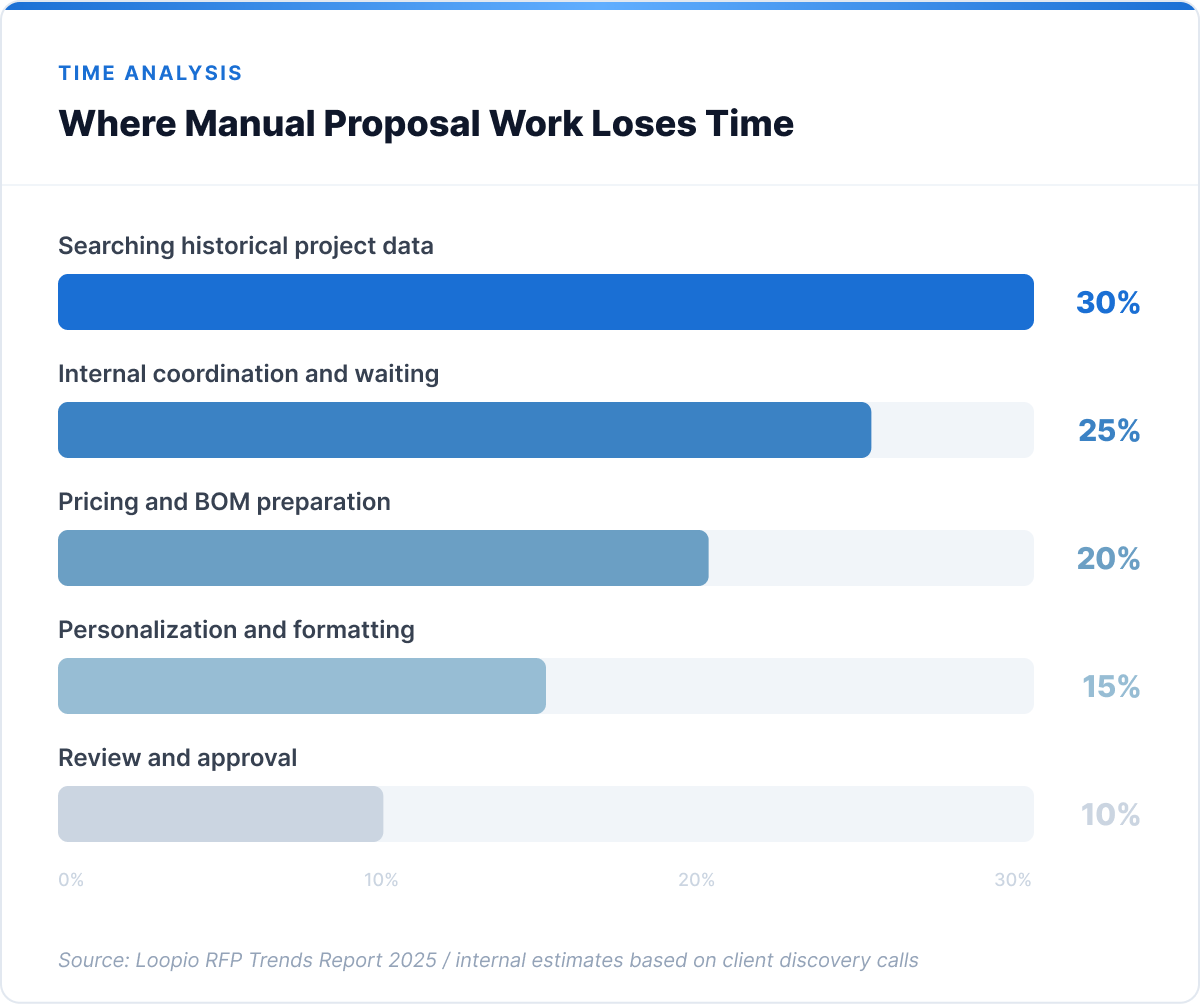
Three places where proposal work loses the most time:

Searching for data from past projects. The sales rep knows the company did a similar project a year ago. They don’t remember where the files are. They spend an hour on SharePoint, ask colleagues, eventually get a folder with half the documentation. The next RFP – same thing from the start.

Internal coordination delays. A technical proposal needs input from the engineering team. The engineering team is busy. The sales rep waits three days for a component estimate. The client is talking to a competitor in the meantime.

Formatting and personalization. The proposal is ready on substance, but it needs to be adapted to the client’s format, relevant project references added, a cover page prepared. Another two to three hours of work.

Every one of these activities is repetitive. Each one draws on data the company already has. And each one is a candidate for automation.
What an AI agent actually does in the proposal process

An AI proposal agent isn’t a document template with auto-fill. It’s a system that executes a sequence of actions: it reads the incoming request, searches the company’s own data repositories, generates an initial draft with a source citation for every line item, and hands off to a human for review and finalization.

The critical distinction: the agent works exclusively on the company’s own data. It doesn’t generate numbers from the language model. It doesn’t invent prices or specifications. It retrieves them from historical projects, pricing sheets, cost databases, and ERP systems – and cites the specific source for each item.

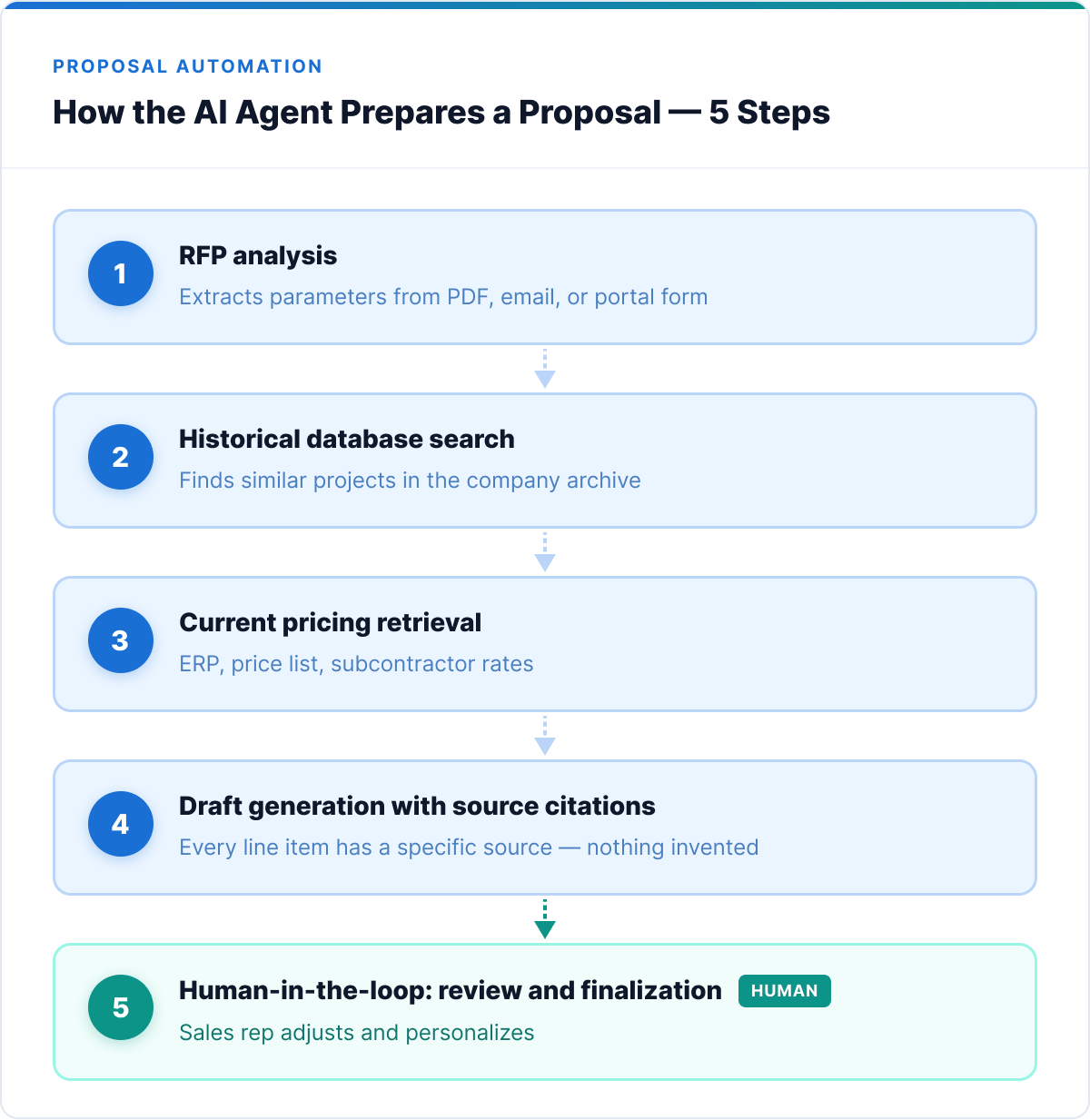
In practice, the sequence looks like this:

Step 1: RFP analysis The agent reads the incoming document (PDF, email, portal form) and extracts the key parameters: scope of work, technical specifications, delivery timeline, formal requirements.

Step 2: Historical database search The agent searches the archive of past projects for similar parameters: comparable scope, industry, scale. It pulls cost data and pricing structures from reference projects.

Step 3: Current pricing retrieval The agent queries the ERP system or pricing database for current component prices, labor rates, and subcontractor costs.

Step 4: Draft generation The agent produces a proposal structure with populated line items, source references, and suggested project references. The sales rep receives a working draft to review and adjust – not a finished document to send.

Step 5: Human-in-the-loop The person reviews, corrects, tailors the argument to the specific client context, and approves. Time for this phase: one to two hours instead of two to three days of data gathering.
ROI calculation: what manual proposal preparation actually costs

The cost is rarely calculated directly. Here it is.

Assumptions for a company with 5 people involved in proposal work:

  • Average time per proposal: 25 hours (Loopio RFP Trends 2025)
  • Monthly RFP volume: 15
  • Average fully-loaded hourly cost (sales rep + technical support): €45

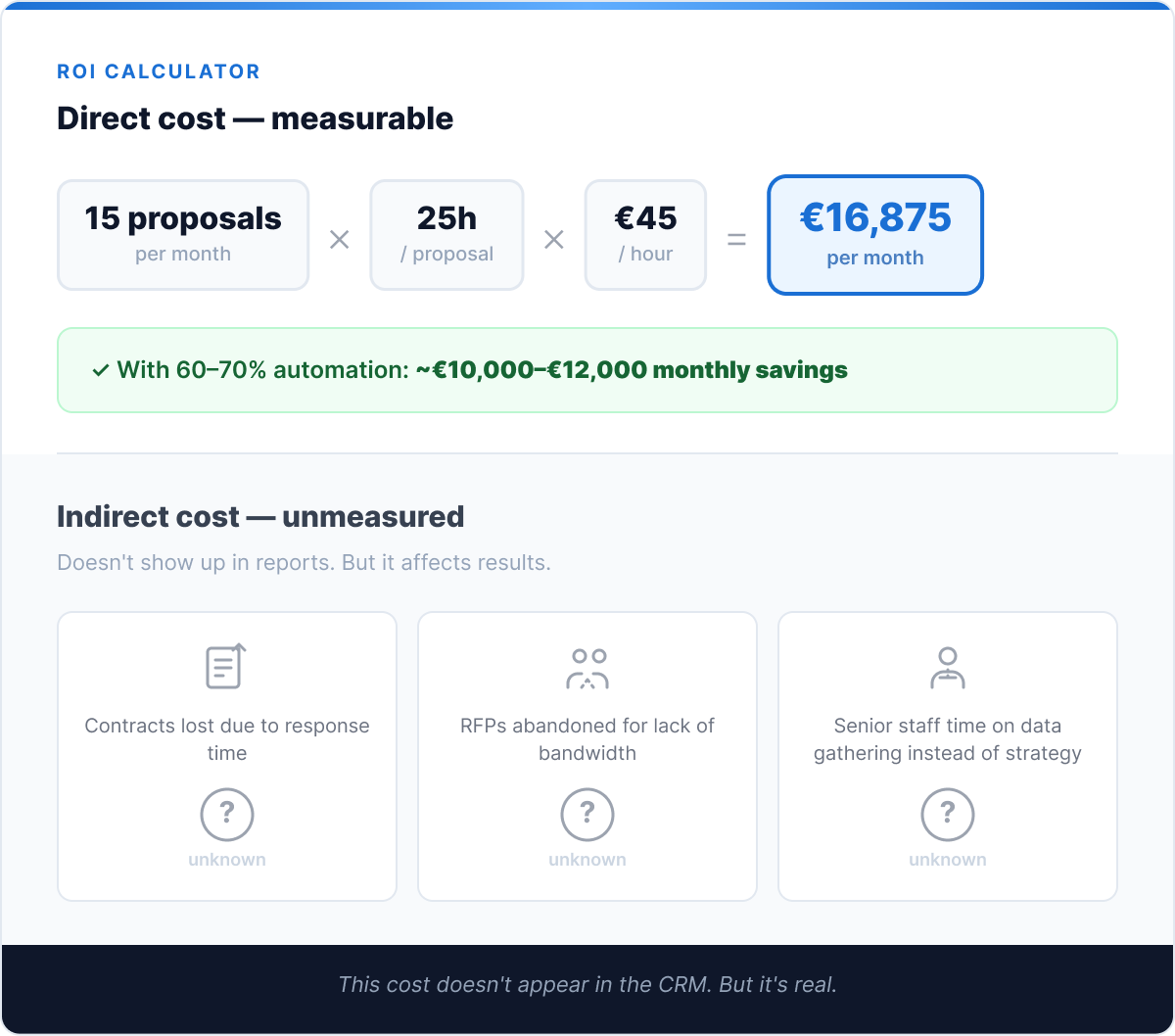
Monthly manual cost: 15 proposals × 25h × €45 = €16,875 per month

Annually: ~€202,500 in labor time spent purely on proposal preparation.

This isn’t a cost that can be fully recovered – the review, personalization, and approval phases will always remain with a human. But if automation takes over the data gathering and draft generation phases (approximately 60–70% of total time), the potential savings are:

~€121,500–€141,750 per year for a team handling 15 proposals per month.

But the direct cost is only half the equation. A slow proposal process also generates an indirect cost: contracts that go to competitors because the response arrived too late. That cost doesn’t show up in any report. And because it’s invisible, nobody fixes it.
When AI proposal automation makes sense – and when it doesn’t

An honest answer requires naming the limits.

Automation delivers the highest ROI when:

  • The company processes at least 8–10 RFPs per month with a repeatable structure
  • Cost data and historical projects are accessible in a system – not locked in specific people’s heads
  • Proposals draw heavily on repeatable components, rates, or scopes of work
  • ERP or pricing system integration is technically feasible

When to wait, or start with data cleanup first:

  • Every proposal is completely unique and requires a specification built entirely from scratch – the automation scope will be minimal
  • Historical project data and cost data aren’t structured or centrally accessible – the agent has nothing to work from
  • Volume is below 5–8 proposals per month – the implementation payback threshold is hard to reach at low volume

Transparency here is our standard. If a discovery workshop reveals the data isn’t ready, we say so directly and propose where to start instead.


Case study: B2B manufacturing company – from weeks to one day

One of our partners is a B2B manufacturing company handling several dozen RFPs per month, each requiring pricing based on technical documentation and current component costs. Each proposal involved three to four people and took three to ten working days to prepare.

The problem: proposal data was scattered – pricing in Excel, historical projects on SharePoint with inconsistent folder structures, key knowledge held by specific senior engineers. With growing inquiry volume, the team regularly worked overtime. Some RFPs were abandoned because there wasn’t capacity to respond.

The solution: An AI agent integrated with the historical project database, pricing catalog, and ERP system. Before the agent went live: three weeks of data cleanup and indexing. Then a four-week PoC on a selected proposal type.

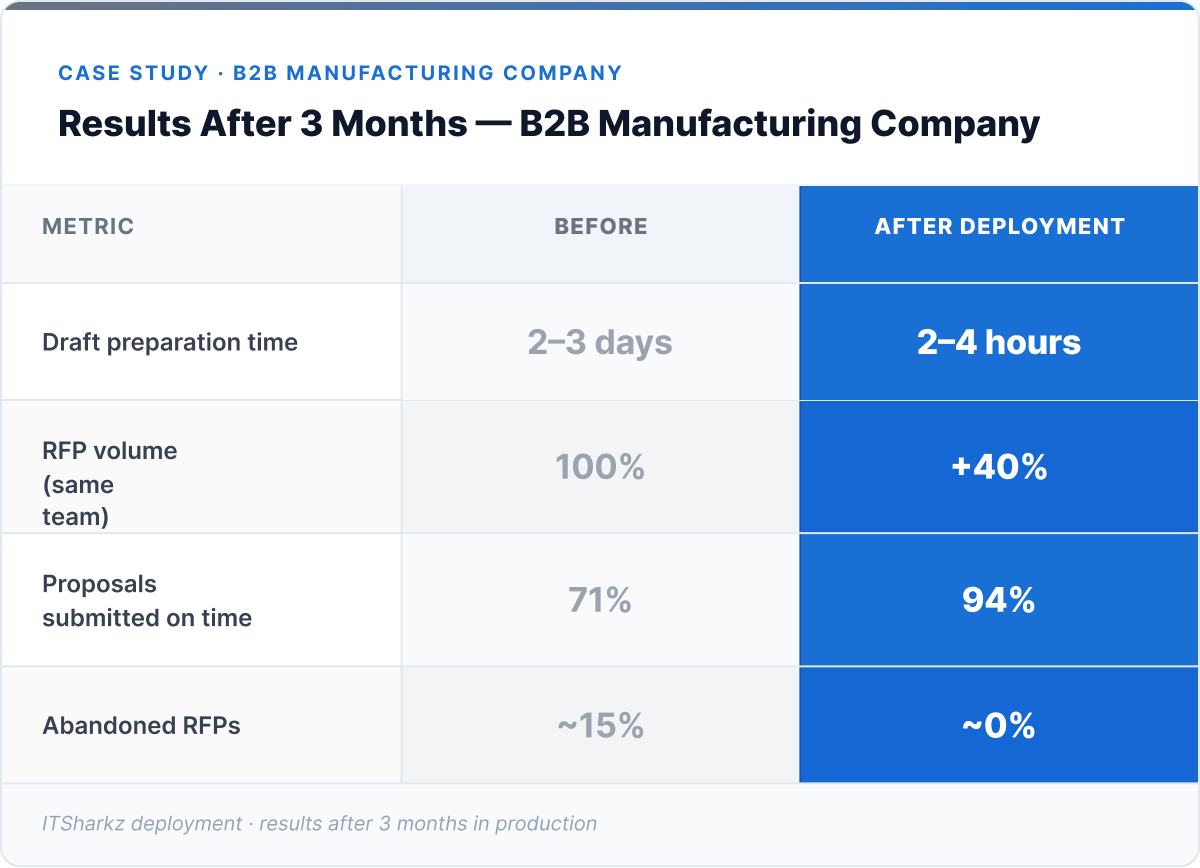
Results after three months in production:

  • Draft preparation time: from 2–3 days to 2–4 hours
  • RFP volume handled: up 40% with the same team
  • Proposals submitted on time: from 71% to 94%
  • Abandoned RFPs: from ~15% to near zero

The value of this deployment doesn’t lie solely in time savings. It lies in the ability to participate in more tenders without additional headcount.

→ See how ITSharkz builds AI agents for proposal and sales processes
How to start: a 6-week implementation model

The most common mistake when automating proposal preparation: trying to automate the entire process at once. The right approach is a narrow PoC on one proposal type, with well-prepared data as the foundation.

Week 1–2: Discovery and data audit Mapping the current proposal process, identifying RFP types and volume, assessing the availability and quality of historical data. This phase often reveals that two to three weeks of data cleanup are needed before the agent can be configured.

Week 3–4: Configuration and integrations Indexing the historical project base, integrating with the pricing catalog or ERP, configuring business rules (what the agent suggests, which items require human validation).

Week 5–6: PoC on the selected proposal type The agent runs on real incoming RFPs in “suggest only” mode – generating drafts while the team evaluates quality and calibrates rules. At the end of the PoC: a performance report as the basis for a go/no-go decision on full deployment.

Total timeline from workshop to production: 8–12 weeks for one proposal type with available data.

For the full methodology – from selecting the right pilot use case to pricing models – read our guide to implementing AI automation in your company.


Summary

AI proposal automation is one of the few areas where the ROI of an AI agent deployment is fast and clearly measurable – because proposal preparation time can be counted before and after, and the effect shows up within weeks.

Three things to remember:

  • The problem is in the data, not the technology. An AI agent is only as good as the historical project base and pricing data it has access to. Cleaning up data before the deployment isn’t an extra cost – it’s the precondition for the system to work.
  • Automation covers 60–70% of total time. The data gathering, historical search, and draft generation phases. Review, personalization, and the final decision stay with the human – and that’s exactly right.
  • 68% of the competition is already in the process. Every month without automation is a month someone else is building the proposal history and data foundation that makes their agent more effective over time.

How many RFPs does your team handle per month? One workshop conversation is enough to know how much of that can be accelerated.
Book a free workshop with ITSharkz

Pilot Purgatory: Why Most AI Agent Projects Never Reach Production – and How to Avoid It

Most AI agent projects don’t fail loudly. They fail quietly – a demo that impressed the board, a pilot that ran for three months, a Slack channel that went silent. Nobody cancels the project officially. It just stops being mentioned in the roadmap review.

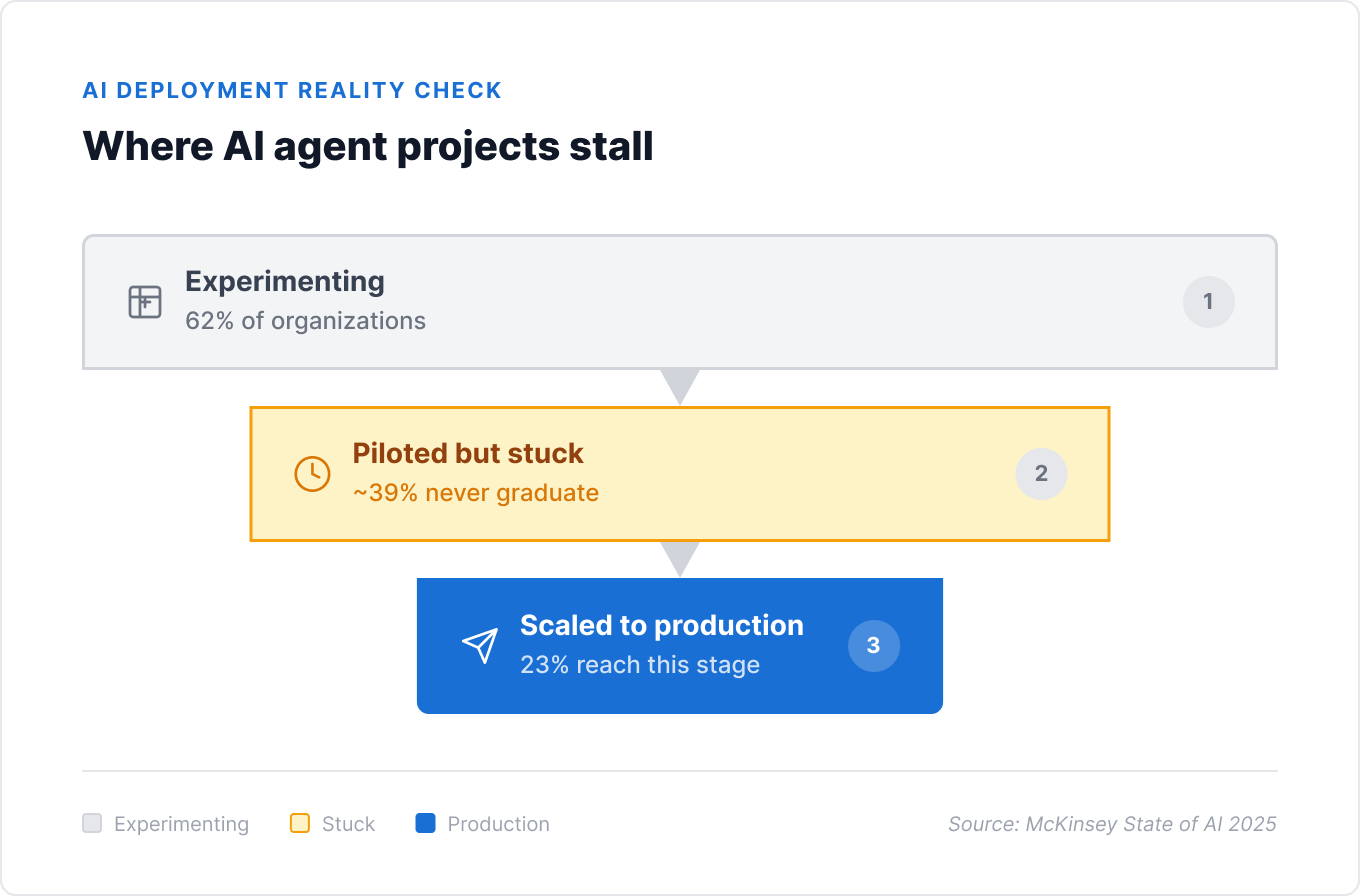
McKinsey’s State of AI 2025 report puts a number on this pattern: 62% of organizations are experimenting with AI agents. Only 23% are actually scaling them. The gap between those two numbers is where most AI budgets quietly disappear.

Gartner’s forecast is more direct still: more than 40% of agentic AI projects will be canceled by the end of 2027 – not because the technology doesn’t work, but because of escalating costs, unclear business value, and inadequate risk controls.

This isn’t a technology problem. It’s a pattern problem. And once you’ve seen it a few times, it becomes predictable.


The pattern: what a stalled pilot actually looks like

Strip away the specifics and most stalled AI agent projects share the same shape.

A team – often IT, sometimes a product manager with enthusiasm and a budget line – builds a proof of concept using an off-the-shelf LLM API. It works in the demo. It answers the questions the team thought to ask. Leadership is impressed. A press release gets drafted, sometimes even sent.

Then it meets production reality. The data the agent needs lives in six different systems, half of them undocumented. The “simple” workflow it was meant to automate actually has fourteen edge cases nobody mentioned in the kickoff meeting. Compliance asks who’s responsible when the agent gets something wrong, and nobody has a clean answer.

Six months later, the pilot is still a pilot. Not because anyone decided to stop – because nobody decided to keep going, either.

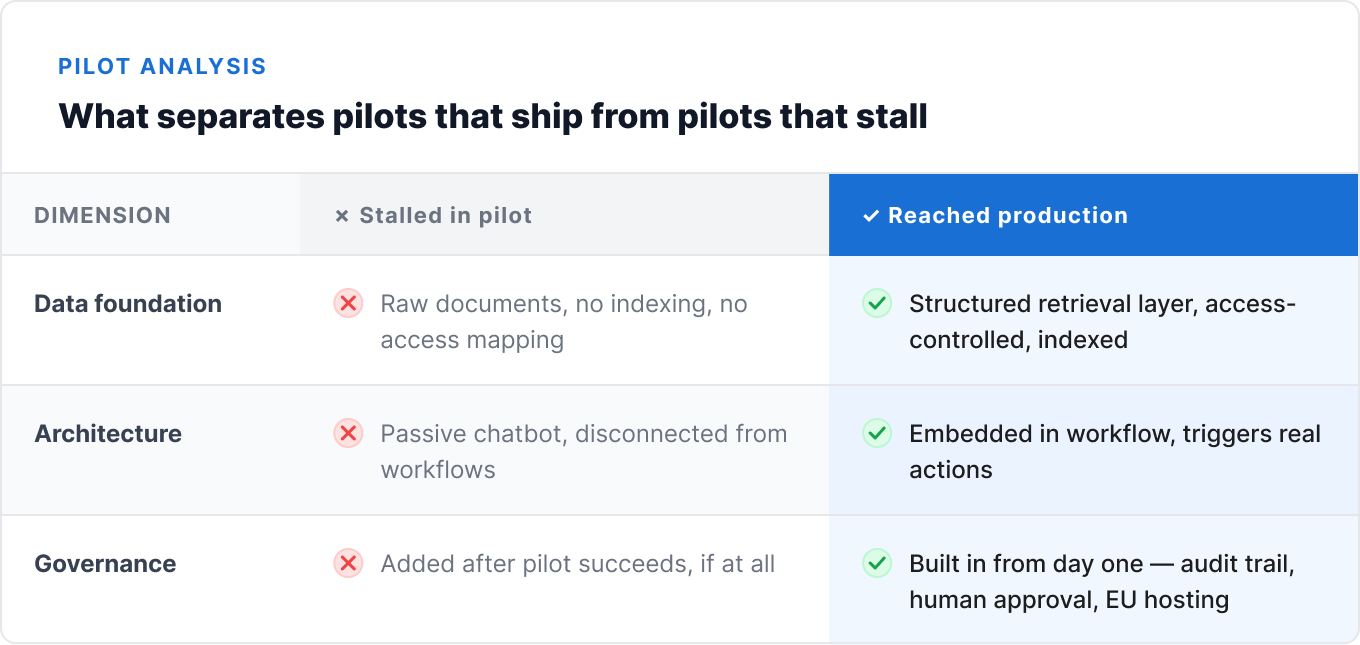
Three things that separate the agents that ship from the ones that get shelved

Across the discovery calls we run with companies evaluating AI agent partners, the same three gaps show up again and again – almost regardless of industry or company size.

1. No organized data foundation

This is the single most common point of failure, and it’s rarely visible until the pilot is already underway.

A team builds a working prototype against a clean, curated dataset – a handful of sample documents, a test database with tidy records. It performs beautifully. Then it’s pointed at the real environment: SharePoint folders with three different naming conventions, an ERP system with inconsistent field formats, contracts scattered across email threads and shared drives with no metadata at all.

The agent isn’t broken. The data foundation underneath it never existed in a form an agent – or honestly, a new employee – could reliably work with.

We’ve had multiple discovery calls with companies that had already run a “first pilot” using a general-purpose LLM API directly against their raw documents, with no retrieval layer, no indexing strategy, and no access control mapping. The pilot looked promising in week one. By week four, the team had quietly stopped trusting its answers.

2. Passive chatbots instead of integrated workflows

The second gap is architectural, not technical. Many first-generation pilots are built as a chat window bolted onto existing systems – a place employees can ask questions, with no real connection to the workflows where decisions actually get made.

This produces a tool people try once, find moderately interesting, and then forget about. It answers questions. It doesn’t do anything – doesn’t trigger an approval, doesn’t update a record, doesn’t flag an exception for review.

The agents that survive into production are designed the opposite way: embedded directly into the workflow, with clearly defined inputs, outputs, and escalation paths. An agent that verifies an invoice and routes it for approval when something looks wrong is solving a different problem than a chatbot that can answer questions about invoices if asked nicely.

3. Governance treated as an afterthought

The third gap shows up later, but it’s often fatal once it does. A pilot that worked fine at small scale runs into a wall the moment legal, compliance, or security asks the obvious questions: Who approved this agent to access this data? What happens when it makes a mistake? Is there an audit trail? Does this comply with GDPR or the EU AI Act?

If those questions get asked for the first time after the pilot has shown promise, the answers usually aren’t ready – and the project stalls while the organization scrambles to retrofit governance onto an architecture that wasn’t designed for it.

Agents built with human-in-the-loop approval, full traceability, and EU-compliant hosting from day one don’t face this wall. They were designed to pass through it from the start.

What an agentic workflow model looks like instead

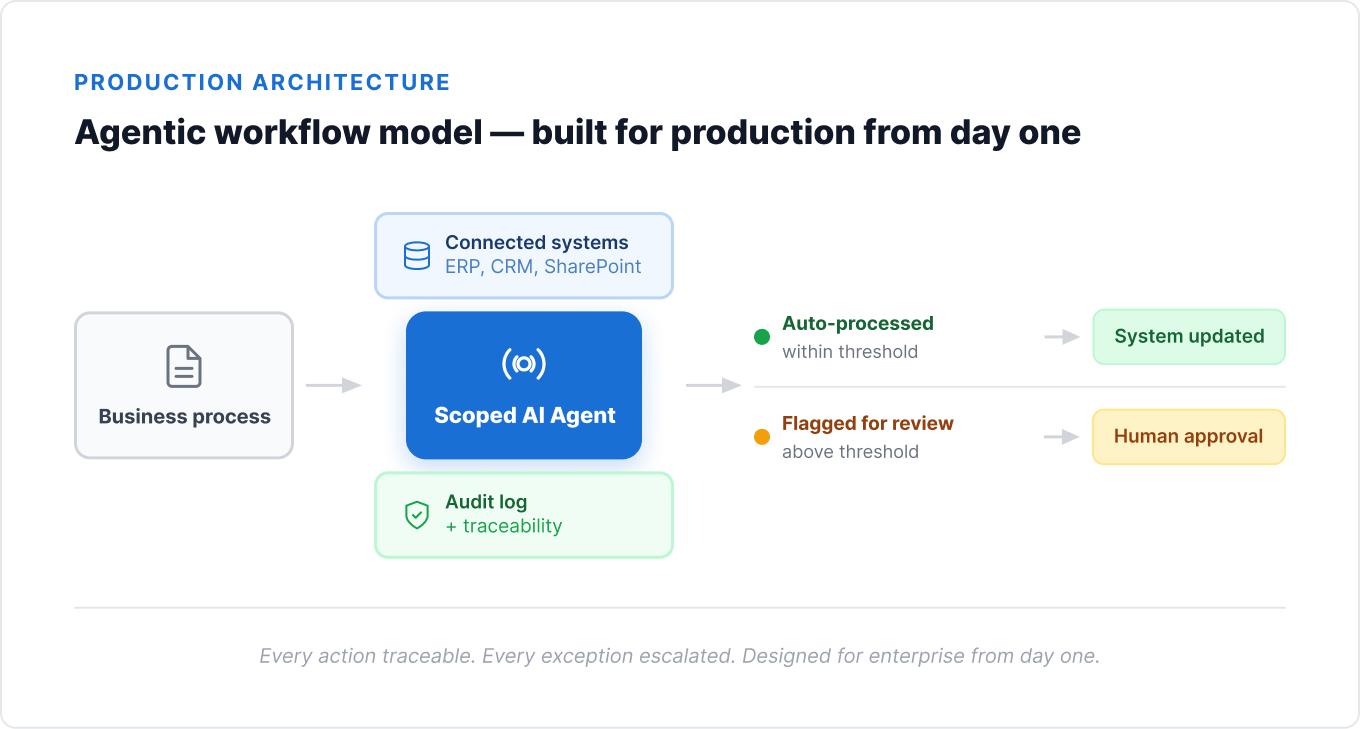
The alternative to the chatbot-bolted-on approach is what we call an agentic workflow model: an agent that’s designed around a specific business process from day one, not retrofitted onto an existing tool stack.

The difference shows up in three concrete ways:

The agent has a defined scope, not an open-ended mandate. Instead of “answer any question about our documents,” the brief is “verify incoming invoices against purchase orders and flag discrepancies above a defined threshold.” Narrow scope means the agent can be evaluated against clear success criteria from week one.

The agent connects to systems, not just to a chat window. It reads from the ERP, writes back to it, triggers a notification when something needs human review. The workflow doesn’t change to accommodate the agent – the agent is built to fit the workflow that already exists.

The agent’s decisions are traceable from the start. Every action is logged. Every escalation includes the reasoning that triggered it. When compliance asks “what happened here and why,” the answer already exists – it doesn’t need to be reconstructed after the fact.

This is also why a four-week proof of concept, scoped correctly, tends to outperform a six-month open-ended pilot. A narrow scope with clear data requirements and a defined success metric either proves the case or rules it out quickly – instead of drifting in pilot purgatory for two quarters before anyone admits it stalled.

Want to see what that process actually looks like end to end? Read our guide to implementing AI automation in your company, including how to choose the right pilot use case and what a realistic 4-to-8-week timeline looks like.

A pattern from the discovery calls – anonymized, but consistent

One pattern that comes up often enough to be worth naming: a mid-sized company runs an initial pilot using a general-purpose LLM API connected directly to their internal documents – no retrieval architecture, no access control layer, no defined escalation path. The pilot demonstrates that “AI can answer questions about our policies.” It does not demonstrate that the answers are reliable, auditable, or scoped to what each employee should actually be allowed to see.

Six months later, the pilot is still a pilot. The company has spent budget and built internal skepticism toward AI as a category – not because the underlying idea was wrong, but because the first attempt was architected as a demo, not as production infrastructure.

When we rebuild these projects, the starting point is rarely “build a smarter model.” It’s “build the data foundation and the governance layer the first version never had” – then scope a narrow, measurable pilot on top of it. The technology was never the bottleneck. The foundation was.


How to avoid pilot purgatory: a practical checklist

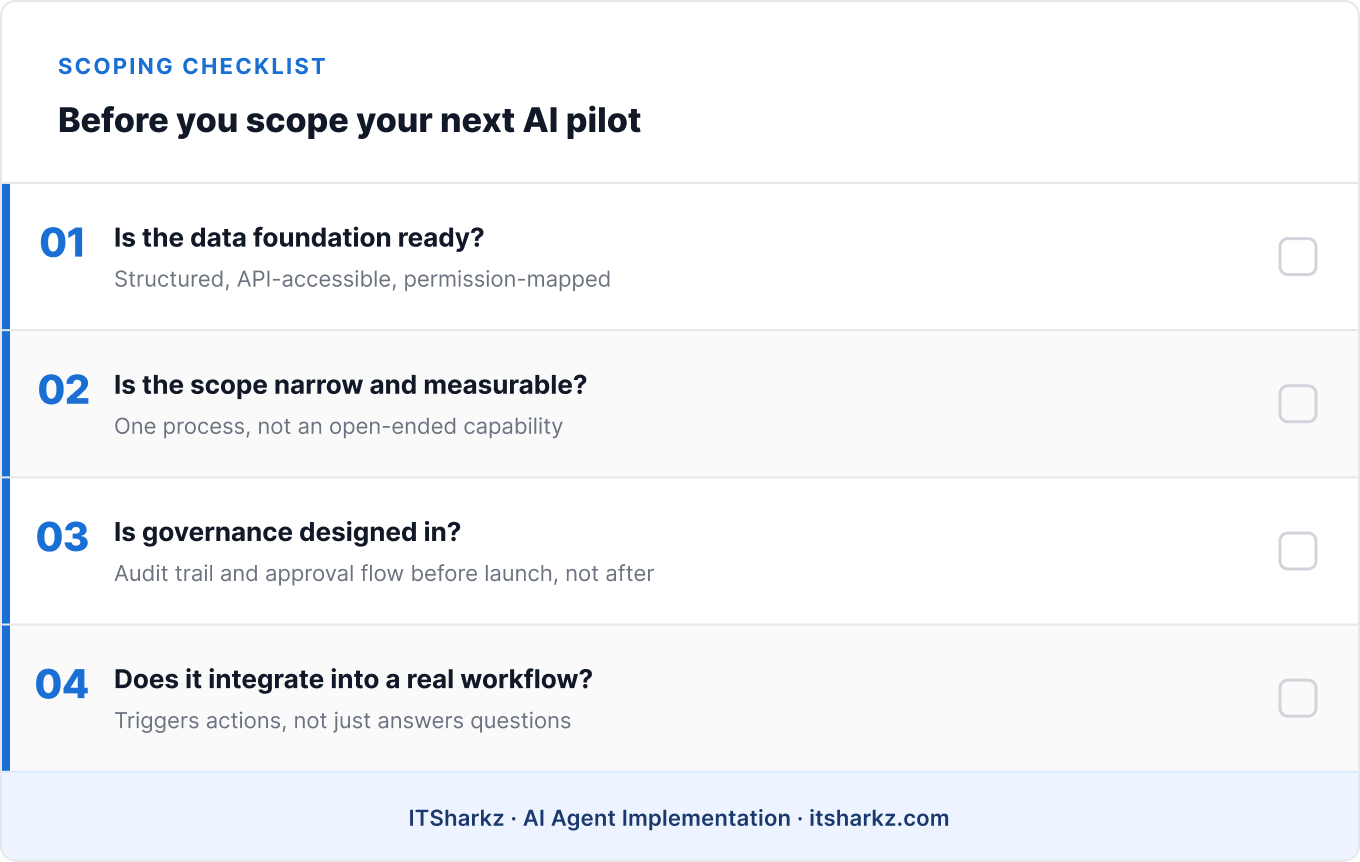
Before scoping your next AI agent pilot, four questions are worth answering honestly:

Is the data foundation actually ready? Not “do we have the data somewhere” – is it structured, accessible via API, and mapped to the access permissions that should govern who (or what) can see it?

Is the pilot scoped to a single, measurable process – or to an open-ended capability? “Automate invoice verification for our top 10 vendors” is a pilot. “Make our knowledge base AI-searchable” is a research project wearing a pilot’s clothing.

Is governance designed in, or planned for later? If compliance, legal, and security haven’t reviewed the architecture before the pilot starts, they will review it after – at a much higher cost in time and trust.

Does the agent integrate into a real workflow, or does it just answer questions? If the success metric is “people find it interesting,” that’s a different project than “this reduces processing time by X%.” Only one of those survives a budget review.

If you can’t answer all four clearly, that’s not a reason to abandon the project – it’s the actual starting point. A properly scoped 4-week PoC is designed to answer exactly these questions before committing further budget.


→ See how ITSharkz designs and builds production-ready AI agents – from data foundation to deployment.

Summary

The gap between 62% experimenting and 23% scaling isn’t a technology gap. It’s a foundation gap – in data, in architecture, and in governance.

Three things to remember:

  • Most pilots don’t fail because the model is weak. They stall because the data foundation underneath them was never built to support production use.
  • A chatbot that answers questions is a different product than an agent embedded in a workflow. Only the second one survives contact with a budget review.
  • Governance designed in from day one is faster, not slower. Retrofitting compliance onto an architecture that wasn’t built for it is what actually kills timelines.

If you’re evaluating where to start, our guide to implementing AI automation walks through how to choose the right pilot use case and what a realistic production timeline looks like.


Talk to ITSharkz about scoping a pilot that’s built to reach production – not just to impress a demo audience.
Book a meeting

How to Implement AI Automation in Your Company — A Practical Guide (With a 4-Week PoC)

Most companies that ask us about implementing AI start the conversation the same way: “We want to deploy an AI agent for customer service / invoicing / HR. Where do we start?”

That’s a good question. The problem usually shows up before anyone gets to answer it, when the next sentence is: “We saw a demo of tool X — maybe we should just deploy that.”

And that’s where most AI automation projects go wrong before they’ve even started.

The tool isn’t the starting point. The process is. Companies that begin by choosing a platform instead of defining a problem end up with a well-configured tool doing the wrong thing — or doing the right thing, but at a cost that no longer makes sense.

Mistake number one: starting with the tool, not the process

The AI tooling market grows faster than most companies’ ability to evaluate it. Make, n8n, LangChain, AutoGen, Microsoft Copilot Studio, custom LLM builds — each has its advocates, and each solves different problems.

None of them will tell you which process is worth automating.

The right sequence looks like this:

  1. Identify the process with the highest volume of repetitive tasks and a measurable cost
  2. Assess whether the data is accessible and structured enough to work with
  3. Define what success looks like and how you’ll measure it
  4. Only then choose the tool that fits the problem — not the other way around

This sounds obvious. In practice, most companies skip steps 1–3, because time pressure and curiosity about the technology outweigh process discipline. A technical partner who doesn’t ask about steps 1–3 before showing you a demo should be a warning sign.

How to choose the right pilot use case

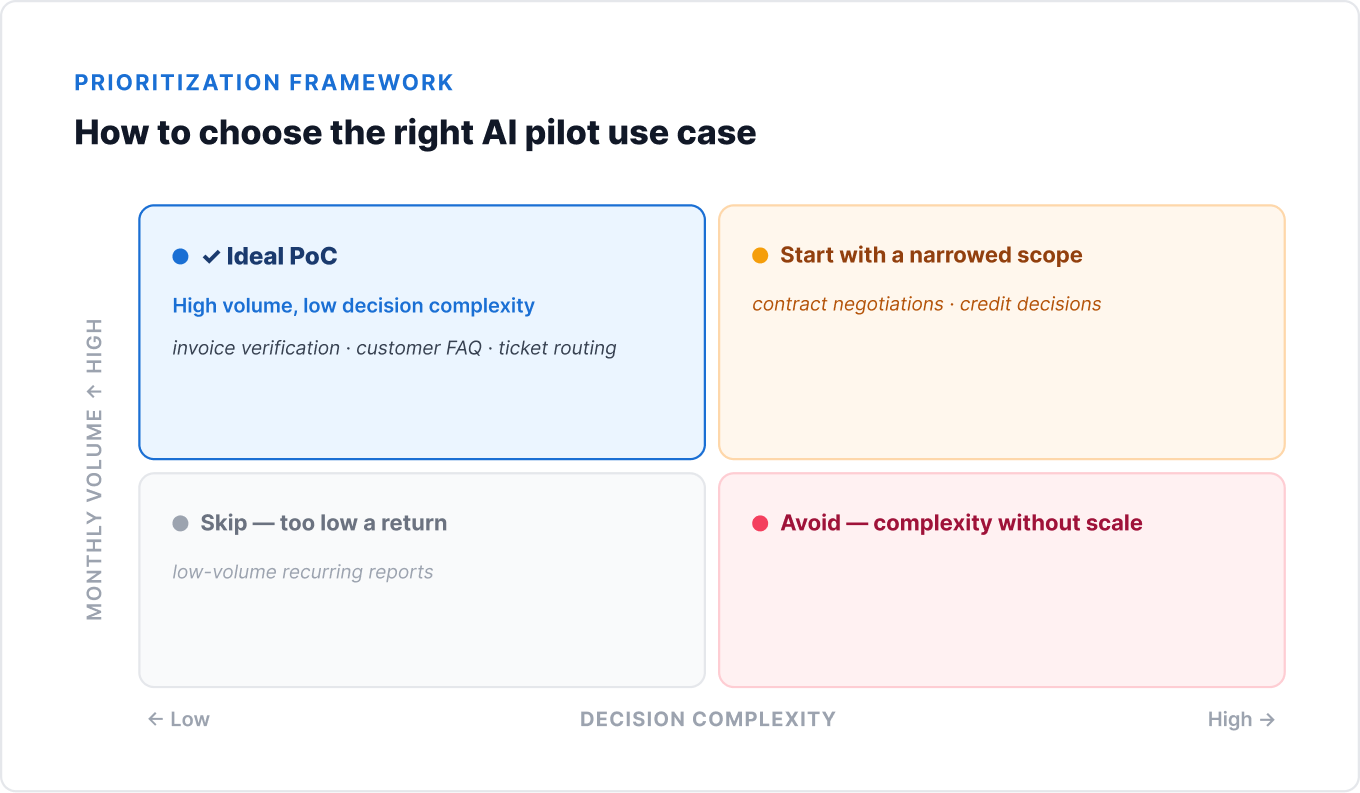
A Proof of Concept (PoC) shouldn’t be ambitious. It should be the smallest possible scope that answers one question: does AI automation actually work in our environment, and does it deliver measurable value?

A good pilot case meets four criteria:

High volume, low decision complexity. A process that runs hundreds of times a month, but follows a similar pattern each time. Verifying invoices from regular vendors, answering repetitive customer questions, routing service tickets — good PoC material. Complex contract negotiations — not.

Accessible, structured data. The agent needs data to work with. If the information critical to the process lives in free-text emails, in specific people’s heads, or in systems without an API — the PoC will be fighting infrastructure, not testing automation. That’s a problem to solve before the pilot, not during it.

A measurable outcome. Choose a process where you can measure the before-and-after state. Hours spent per week, average ticket resolution time, manual error rate, month-end close duration. Without a baseline metric, you don’t have ROI — you have opinions.

Low failure risk. A PoC shouldn’t touch business-critical processes. If the agent makes a mistake during the pilot, the cost of that mistake should be recoverable. This is why early-stage implementations often run in “suggest only” mode — the agent recommends, a human approves.

What a PoC should include — and what it isn’t

This distinction matters, because many companies confuse a demo with a proof of concept.

A demo is not a PoC. A demo shows that a tool can do something in a controlled environment, on sample data. Impressive, but useless as the basis for an investment decision.

A PoC is not an MVP. An MVP (Minimum Viable Product) is the first version ready for end users. A PoC answers the question of whether the approach is feasible — it doesn’t deliver production-ready value.

A good PoC includes:

  • Your company’s real data (even anonymized) — not sample datasets provided by a vendor
  • One specific sub-process — not “automate customer service” as a whole, but e.g. “automatically verify invoices from 10 regular vendors”
  • Measurable KPIs defined before the start — percentage of cases handled correctly, processing time, number of escalations
  • Integration with at least one production system (even in read-only mode) — a PoC that only runs on data exported to Excel doesn’t test what will actually hurt at full deployment
  • A defined definition of success — at what level of accuracy do you recommend moving to full deployment?

What a PoC doesn’t need: a full UI, production documentation, integration with every system, or handling of 100% of edge cases.

Timeline: from workshop to production deployment

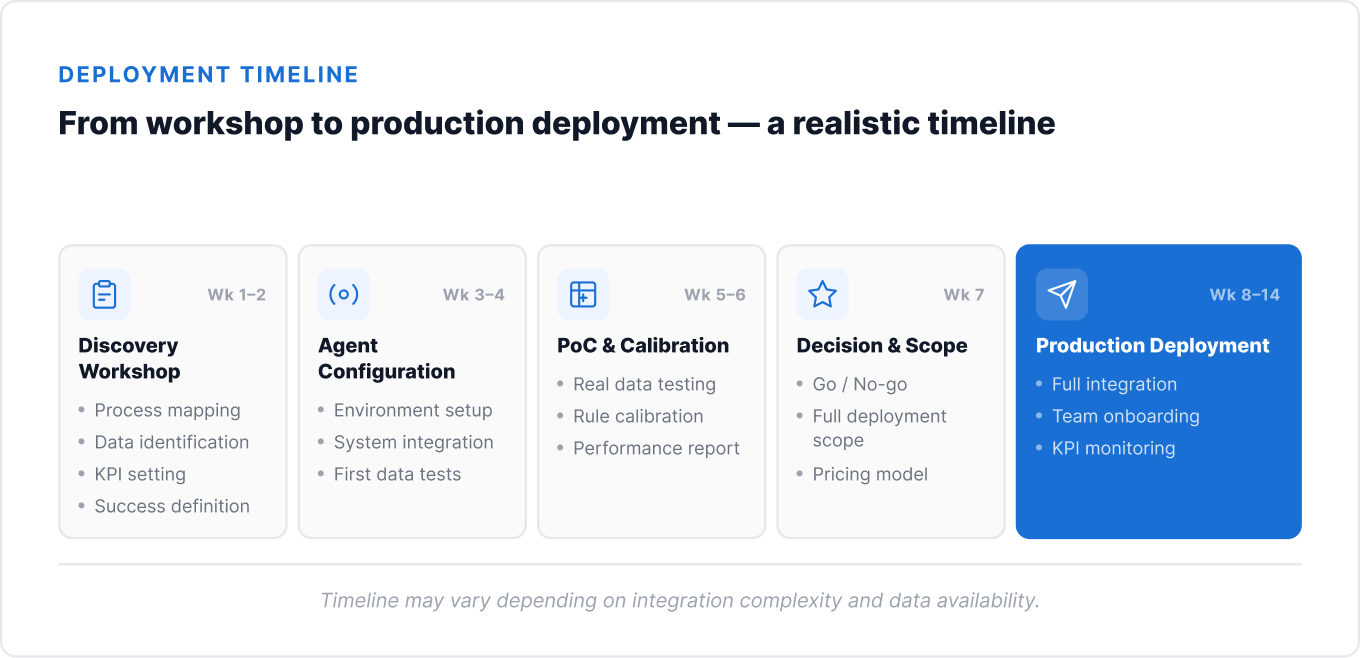
Below is a realistic timeline for a typical AI automation project in a 50–400 person company. It assumes one specific process, one system to integrate with, and a client-side team ready to collaborate.

Week 1–2: Discovery workshop
Mapping the current process, identifying volume and bottlenecks, assessing data quality and accessibility, defining business rules, setting KPIs and success criteria. This is the most important stage — it determines whether the project hits the mark.

Week 3–4: Agent configuration
Environment setup, first integration with a production system (read-only), model and rule configuration, testing on historical data.

Week 5–6: PoC and calibration
Running the agent on real data in “suggest only” mode, measuring performance against defined KPIs, iterative calibration of rules and model.

Week 7: Decision and scope
PoC report with concrete results, go/no-go recommendation, defining the full deployment scope and pricing model.

Week 8–14: Production deployment
Full integration, edge case handling, team onboarding, launching monitoring and a KPI dashboard, 30/60/90-day follow-up.

Total: 8–14 weeks from the first workshop to a system running in production. For simpler processes (one system, structured data), it can be shorter. For processes requiring multiple integrations or messy data — longer.

What to require from a technical partner

This is a question decision-makers rarely ask explicitly before signing a contract. The result is disappointment three months later, when it turns out “AI implementation” meant configuring an off-the-shelf SaaS tool with minimal customization.

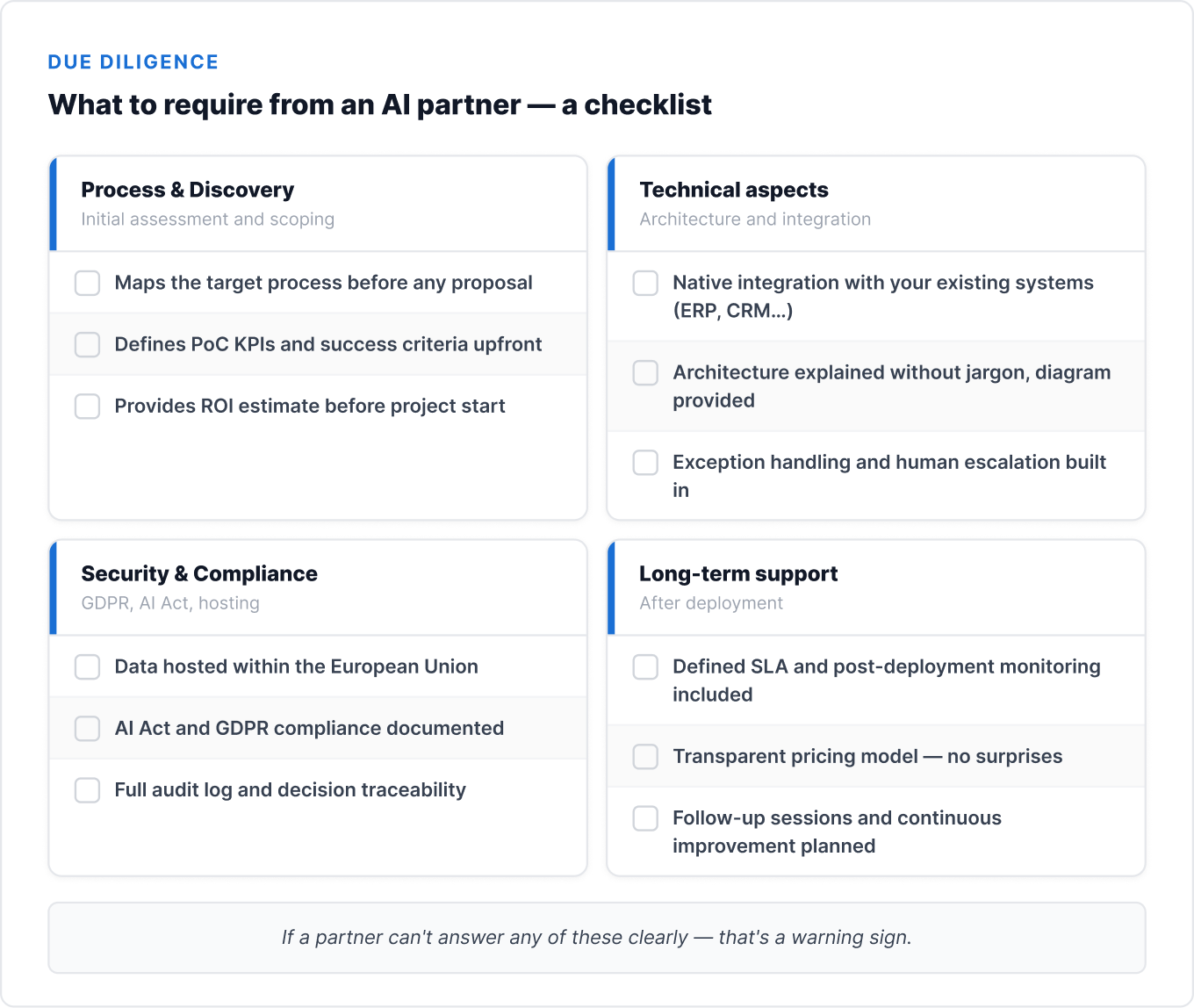
A checklist worth having when evaluating proposals:

Process and discovery

  • Does the partner start with a discovery workshop, or with a tool demo?
  • Do they ask about data, integrations, and success criteria before presenting a quote?
  • Can they say “this process isn’t a good fit for AI automation — here’s why”?

Technical aspects

  • Is the agent built around your data and processes, or is it a pre-built product with configuration on top?
  • How does integration with your systems (ERP, CRM, knowledge base) work?
  • Is the code and architecture yours after the project ends — or are you locked into the vendor’s platform?

Security and compliance

  • Where is the data hosted — within the EU?
  • How is data anonymized before being sent to the LLM?
  • Does the deployment comply with GDPR and — where applicable — the EU AI Act?

Long-term support

  • Does the partner offer monitoring and maintenance after deployment?
  • What does the follow-up model look like (30/60/90 days)?
  • Do you have access to a KPI dashboard and performance reports?

Pricing model: setup fee + subscription vs. time & materials

Before signing a contract, make sure you understand what you’re actually buying.

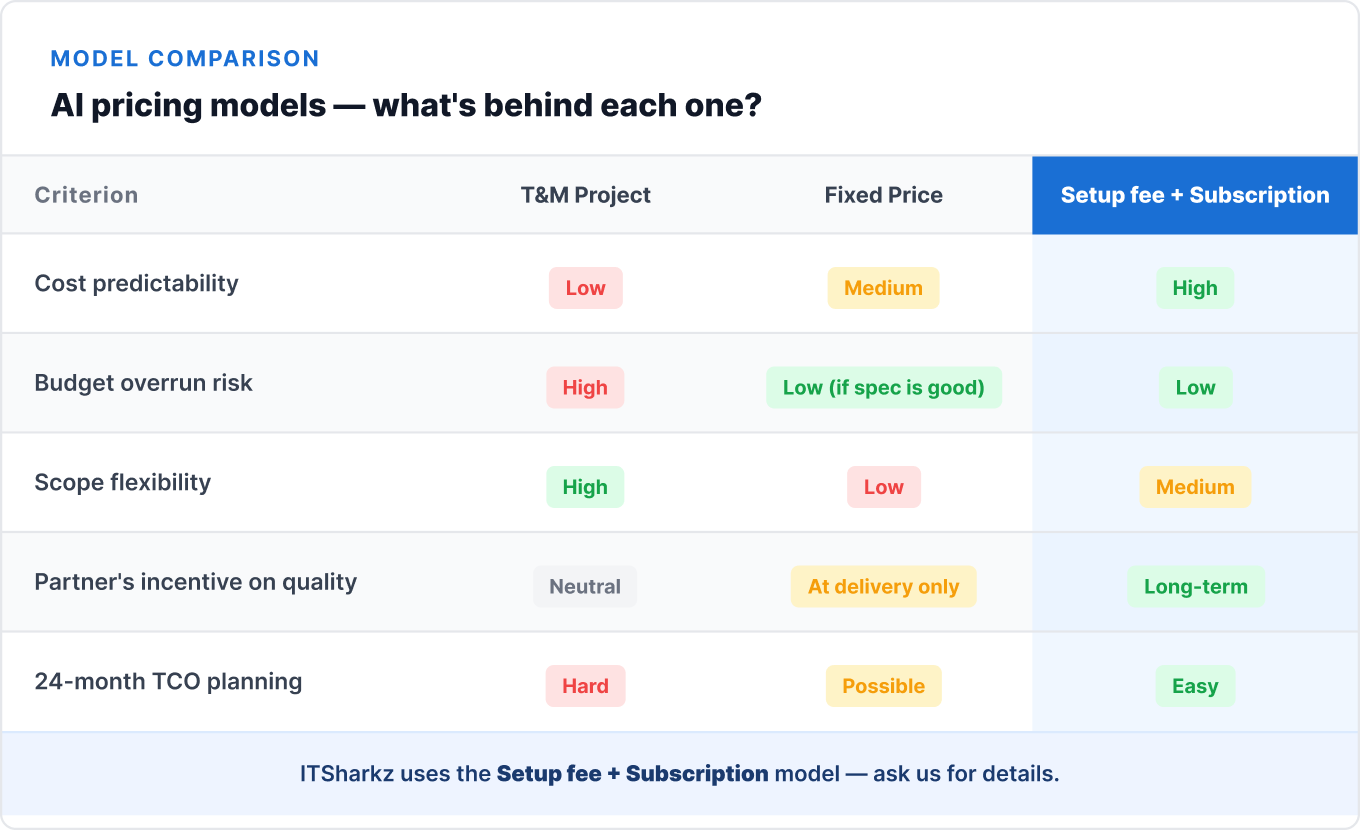
Three main models exist in the market:

Time & Materials (T&M)
You pay for the team’s time. Flexible, but hard to budget for. The risk of scope overrun sits on your side if requirements weren’t clearly defined upfront.

Fixed price
A set price for a predefined scope. Good budget protection, but requires a very precise specification before the start — every scope change generates an addendum. Rarely seen in AI projects, where scope tends to evolve during the PoC.

Setup fee + monthly subscription
A one-time implementation and configuration cost, followed by a monthly fee for hosting, maintenance, monitoring, and support. This is the model we use at ITSharkz. Advantages: predictable operating cost, the partner has a vested interest in the system performing well long-term (not just at handover), and it’s easier to plan TCO over 24 months.

TCO over 24 months — what’s worth calculating:

When comparing offers, consider not just the implementation cost, but also:

  • Monthly LLM model cost (scales with volume)
  • Hosting and infrastructure cost
  • Maintenance cost and business rule updates
  • Cost of future integrations with new systems
  • Cost of your own team’s time and involvement

A cheaper upfront deployment often means a more expensive maintenance bill later — or no maintenance at all, and system degradation over time.

Summary

Implementing AI automation isn’t an IT project. It’s a business project that requires leadership buy-in, a clearly defined problem, and a partner who understands your processes — not just their own tools.

Three things to remember:

  • Start with the process, not the tool. Choose one specific sub-process with high volume, measurable cost, and accessible data. A 4–6 week PoC will tell you the real potential.
  • A PoC is not a demo. It requires real data, integration with a production system, and KPIs defined before the start. Without that, you don’t have a basis for a decision.
  • Ask about TCO, not just implementation price. Maintenance, monitoring, rule updates, and LLM cost over time are part of the equation — and they determine whether the project is actually worth it.

If you want to see what an early-warning case looks like — what happens when this process is skipped — read our article on why most AI agent projects never reach production.


Book a discovery workshop with ITSharkz and start from the right step.
https://itsharkz.com/ai-agents/